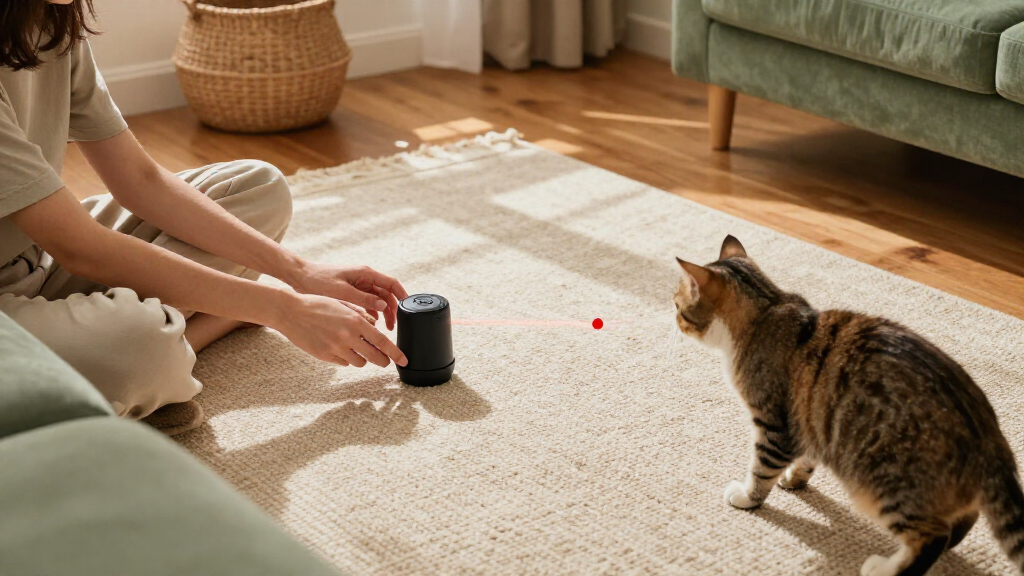

This guide shows cat owners how to choose a safe play area, prepare and operate an automatic laser toy, and check how their cat responds. It is for beginners and takes about 15-25 minutes, including the first supervised play session. Always follow the instructions supplied with your specific toy; its controls, motion pattern, and safety features may differ.

Get pet supplies delivered free with Prime
- Fast, free delivery on millions of items
- Prime Video, Amazon Music and more included
- Member-only deals all year

YVE LIFE Automatic Interactive Laser Cat Toy, 4th Gen Motion Activated with Random Trajectory
- ✔ Session duration: 15 minutes
- ✔ Speed modes: Fast, slow, and mixed
- ✔ Motion sensor range: Up to 13.1 ft (4 m)
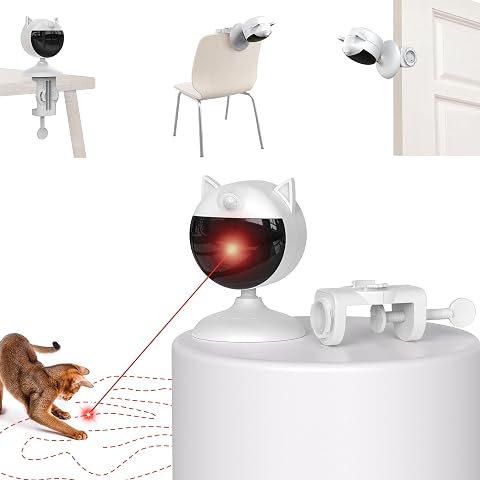
Potaroma Motion-Activated Cat Laser Toy with Clamp, Cream White
- ✔ Run time: Five minutes per activation
- ✔ Modes: Sensing and timer
- ✔ Mounting: Dual clamp

YVE Life Interactive Motion-Activated Laser Toy for Cats
- ✔ Session duration: 15 minutes
- ✔ Activation: Motion activated
- ✔ Sensor range: 0–13.1 ft
Difficulty: Beginner | Time: 15-25 minutes
What You’ll Need
Tools & Materials:
- Automatic laser cat toy and its instruction manual
- Batteries or charging cable, if required
- A clear indoor play area
- A small toy or treat your cat can physically catch
Knowledge:
- Basic ability to install batteries or charge a small device
- Ability to supervise your cat during play
Check the product label and manual for the laser class, intended use, operating limits, and cleaning instructions. Do not use a damaged toy or one with a missing safety label. Keep the device and beam away from children and people who may look into the light.
YVE LIFE Automatic Interactive Laser Cat Toy, 4th Gen Motion Activated with Random Trajectory
The YVE LIFE 4th Gen takes our top spot because it combines the lineup’s longer 15-minute sessions with three speed settings and adjustable direction. Its dual motors are described as producing truly random trajectories, a useful distinction for households where a predictable loop may quickly lose a cat’s attention. The design also runs on a rechargeable battery or while plugged in, giving us flexibility to place it where the laser can sweep the intended play area.Compared with the Potaroma clamp model, this YVE gives a longer session but lacks a clamp, so it depends on a suitable tabletop or other stable surface. Compared with the nearly matching YVE Life Interactive, the 4th Gen has a more explicit random-trajectory and quiet, gearless-motor description, making its role easier to justify. The tradeoff is the motion sensor: it triggers only once every two hours, so this is scheduled-feeling background enrichment rather than an on-demand button replacement. It is also indoor-only, and the supplied guidance calls for a specific 5V/1A charger; using a faster charger may damage the battery.
Pros:
- 15-minute automatic sessions
- Three speed modes and adjustable laser direction
- Rechargeable battery with stated runtime up to two days, plus plugged-in use
- Dual motors are described as creating random trajectories
Cons:
- Motion activation is limited to once every two hours
- Requires a 5V/1A charger; fast charging may damage the battery
- Indoor use only and not water resistant
Best for: Cat owners who want longer automatic sessions, multiple speed options, and a rechargeable tabletop toy that can also run plugged in.
Not ideal for: Anyone who needs frequent motion-triggered sessions, clamp mounting, outdoor use, or a toy that can be charged with any adapter.
Bottom line: We recommend the 4th Gen for the broadest hands-free play setup, provided its two-hour sensor interval and tabletop placement suit your routine.
“We recommend the 4th Gen for the broadest hands-free play setup, provided its two-hour sensor interval and tabletop placement suit your routine.”
Potaroma Motion-Activated Cat Laser Toy with Clamp, Cream White
Choose the Potaroma clamp model when securing the toy is more important than running a long session. Its dual clamp can attach to a household surface, which may make positioning easier where a tabletop is crowded or vulnerable to being bumped. It offers sensing and timer modes, supports use while charging, and lists five to ten days of battery life with regular use—the longest stated runtime in this group.That setup advantage comes with a different rhythm: each activation lasts five minutes, one-third the stated session length of either YVE model. The mounting guidance also asks for a height of at least 2.8 feet, so it is better suited to homes with an appropriate attachment point than to buyers seeking a low tabletop device. Compared with the YVE 4th Gen, Potaroma is easier to secure but provides fewer listed speed and angle adjustments. The product is not water resistant, and the available details do not specify its sensor range or trigger interval, so we should not assume it can restart more often than its competitors.
Pros:
- Dual clamp helps secure the toy to a household surface
- Sensing and timer modes
- Can operate while charging
- Five to ten days of battery life stated with regular use
Cons:
- Five-minute run per activation is shorter than the YVE sessions
- Recommended mounting height is at least 2.8 feet
- Not water resistant
Best for: Owners who have a secure shelf or similar surface to clamp onto and prefer a compact five-minute burst with a longer stated battery interval.
Not ideal for: Buyers who want 15-minute sessions, a low table placement, or detailed published information about sensor range and trigger frequency.
Bottom line: We’d choose Potaroma for a stable clamp-mounted setup and longer stated battery life, while accepting shorter play bursts and less published sensor detail.
“We’d choose Potaroma for a stable clamp-mounted setup and longer stated battery life, while accepting shorter play bursts and less published sensor detail.”
YVE Life Interactive Motion-Activated Laser Toy for Cats
The YVE Life Interactive is a simple fit for buyers who want the core automatic-play routine: motion starts a 15-minute session, the laser moves randomly, and three speed modes provide some variety. Its 1200 mAh rechargeable battery is listed for up to two days of use, and the toy can run plugged in. Adjustable direction helps tailor the play area to the room, while the stated quiet motor may be useful when the toy shares space with work or rest.Its main challenge is comparison with the YVE LIFE 4th Gen. The listed dimensions, battery, session length, speed settings, and sensor interval are nearly identical, while the 4th Gen description makes a stronger case for its dual-motor random trajectories. That makes this model most compelling when its particular listing or availability suits the buyer, rather than because it offers a clearly superior feature. As with the other YVE, motion sensing triggers only once every two hours, so repeated play requires a person to supplement the automatic routine. It is also intended for indoor placement on a table 8–35 inches high, not clamp mounting like Potaroma.
Pros:
- 15-minute motion-activated sessions
- Three speed modes with adjustable laser direction
- Rechargeable battery with up to two days stated runtime
- Can run plugged in and is described as quiet
Cons:
- Motion sensor activates only once every two hours
- Table placement guidance limits where it fits
- Not water resistant
Best for: Buyers seeking a basic rechargeable, motion-activated tabletop laser toy with 15-minute sessions and three speed choices.
Not ideal for: Those who want a clearly differentiated upgrade over the YVE 4th Gen, clamp mounting, or frequent sensor-triggered play.
Bottom line: We see this as a solid core-feature option, though the 4th Gen is the more distinct pick and Potaroma offers the more flexible mounting method.
“We see this as a solid core-feature option, though the 4th Gen is the more distinct pick and Potaroma offers the more flexible mounting method.”
As an Amazon Associate we earn from qualifying purchases.
Before You Start
Choose a device intended for pets and read its safety instructions before switching it on. Never aim a laser at a person, an animal’s eyes, mirrors, windows, or reflective surfaces. Place the toy where its beam stays on the floor or another safe play surface. Automatic movement does not replace supervision: stay nearby and stop the session if your cat becomes distressed, fixated, or tries to chew the device.
Laser play can leave a cat without the satisfaction of catching anything. Plan to finish with a toy your cat can grab or a small treat, unless your veterinarian has advised against treats.
Step-by-Step Instructions
Step 1: Read the toy’s instructions
Find the manual and identify how the toy turns on, changes modes, and shuts off. Check whether it has a timer, motion sensor, adjustable head, or a recommended session limit. Confirm the required battery type or charging method before use.
Tip: Do not assume that controls or safety features work the same way across models.
Check: You can locate the power control and explain how to stop the toy quickly.
Step 2: Inspect and power the device
Check the casing, lens, battery compartment, and cable for cracks, loose parts, corrosion, or other damage. Install the specified batteries with the correct polarity, or charge the device as directed. Keep charging cables out of your cat’s reach, then disconnect them before play unless the manual explicitly permits operation while charging.
Tip: Stop if the unit is damaged, unusually hot, or has a loose lens. Contact the manufacturer for guidance.
Check: The device is intact and powers on as described in its manual.
Step 3: Prepare a safe play area
Choose an indoor space with a non-slip floor and enough open room for your cat to move. Clear fragile objects, tangled cords, and anything your cat could knock over. Close access to stairs or other hazards if your cat might chase the beam there. Remove mirrors and shiny objects from the beam’s path, and position the toy so the light cannot reach faces or windows.
Tip: Check the beam path from your cat’s floor-level viewpoint as well as from where you will sit.
Check: The beam can travel across a clear surface without crossing eyes, reflective objects, or unsafe areas.
Step 4: Place the toy securely
Set the device on a stable, level surface or mount it only as the manufacturer directs. Point its head toward the intended play area and check that the base cannot slide or tip when your cat runs past. Keep the toy away from edges where it could fall.
Tip: Do not let your cat bat, bite, or carry the unit. Move it to a protected location if your cat can reach it.
Check: The device stays steady and its lens points only toward the safe play area.
Step 5: Test the beam and settings
Stand beside the toy, switch it on briefly, and watch the beam’s full movement. Adjust the position or settings according to the manual if the beam reaches a wall, reflective surface, or area where people or pets could look into it. Set the shortest practical session or timer for the first trial if your model offers one. Turn the unit off after the check.
Tip: Do not look directly into the beam or use a reflective surface to redirect it.
Check: The beam stays within the intended play surface throughout its pattern, and you know how to stop it.
Step 6: Introduce the toy during supervision
Bring your cat into the play area while the toy is off. Let your cat inspect the device from a comfortable distance. Switch it on and observe your cat’s body language. Give your cat space to approach or leave; do not hold the cat near the beam or force interaction.
Tip: End the session if your cat hides, growls, pants, or seems unable to disengage. Try again another day with a shorter session or use a different play activity.
Check: Your cat can approach, play, or walk away without signs of distress.
Step 7: Run a short play session
Stay with your cat and let the toy run only for the period permitted by its manual. Watch for the beam leaving the safe play zone, overheating, unusual noises, or your cat trying to reach the unit. Switch the toy off immediately if a hazard appears. Avoid extending play simply because the toy has an automatic mode.
Tip: Follow the manufacturer’s session limit and allow the device to cool between sessions if the manual requires it.
Check: The session ends within the stated limit, with the toy and play area still safe.
Step 8: End with a catchable reward
Before putting the toy away, switch it off and offer a physical toy your cat can catch, or a small treat if appropriate. Give your cat a chance to pounce and finish the play sequence. Put the laser toy away where your cat cannot activate or damage it.
Tip: Keep treats small and account for them in your cat’s usual food allowance.
Check: Your cat has a clear end to play, and the laser is off and stored safely.
Common Mistakes to Avoid
- Letting the beam cross faces, eyes, or reflective surfaces. — Test the complete beam pattern before play and reposition the device until it stays on a safe surface.
- Leaving the automatic toy running while no one is watching. — Supervise each session, use the manual’s timer and session limits, and turn the toy off afterward.
- Ending every session without letting the cat catch anything. — Finish with a physical toy or suitable treat so the cat has a catchable reward.
Troubleshooting
Problem: The laser pattern leaves the play area.
Solution: Switch the device off. Change its position or angle, clear reflective objects, and test the full pattern again before allowing your cat to play.
Problem: The toy does not turn on or stops quickly.
Solution: Turn it off and check that batteries match the manual and are installed with the correct polarity. Recharge it as directed. If it still fails, stop using it and consult the manufacturer.
Problem: Your cat ignores the beam or walks away.
Solution: Do not force participation. Try a brief session at a different time or use a catchable toy instead; some cats do not enjoy laser play.
Problem: Your cat becomes agitated or keeps searching after play.
Solution: End laser sessions and switch to a physical toy that the cat can catch. If the behavior persists or concerns you, ask your veterinarian for advice.
What Success Looks Like
The toy is undamaged, stable, and used according to its manual. During a supervised session, the beam stays on the chosen safe play surface, the cat can leave freely, and the device is switched off within its session limit. The session ends with a catchable toy or suitable reward, and the laser is stored where the cat cannot reach it.
Next Steps
After each use, switch the toy off and store it out of your cat’s reach. Clean it only as the manufacturer directs, and check the casing and lens before the next session. Keep sessions within the manual’s limits and adjust or stop laser play if your cat shows distress or persistent searching. Ask your veterinarian about play options if you are unsure what suits your cat’s age, mobility, or health.
Frequently Asked Questions
How long should I run an automatic laser cat toy?
Use the session limit in your toy’s manual and supervise the entire time. If the manual gives no limit, keep the first trial brief and stop sooner if the device heats up or your cat seems distressed.
Can I leave the toy on while I am out?
No. Stay present so you can stop the toy if its beam enters an unsafe area, the device shifts, or your cat becomes upset.
Is laser play suitable for every cat?
No. Some cats ignore the beam or become frustrated by a target they cannot catch. Offer a physical toy instead if your cat dislikes laser play or has difficulty disengaging.
Why should I offer a toy or treat at the end?
A catchable toy or suitable treat gives your cat a physical end to the chase. It also lets you close the session before storing the laser.
Halloween Picks
halloween
As an affiliate, we earn on qualifying purchases.